Setup Digital Security Passkeys and Legacy Settings
From overwhelmed to organized, secure, and in control
This module provides a step-by-step guide to updating your digital security settings. This is important since a new security technology (Passkeys) has recently been introduced. These new Passkeys are much more secure than passwords. They're also much more convenient.
In addition, this module helps users to set up their digital estates with the three main providers: Google, Microsoft, and Apple. Setting up your digital estate ensures that your photos will never become permanently lost. This happens quite frequently as providers will not allow anyone to access another person's account — not even that person's executor (unless they have a court order). Without setting up the legacy feature (by adding legacy contacts), an account may become permanently locked.
Once you have completed this module, you will likely feel a great sense of relief. It feels great to get things done!
Note that everything this module directs you to do is part of the standard account features with providers like Google and Microsoft. There is no cost to any of this. Only at the end of the module do I recommend that you buy something — a password manager with a legacy feature.
To proceed, follow the guide below — one step (dropdown) at a time.
Print the Template↓
Print a copy of this template.
Using paper is highly recommended! A paper copy can be kept with all of your other important papers (preferably in your executor binder), and is easy for your loved ones to find.
You will need at least one template per person. Anyone who has more than one Google or Microsoft Account will need more than one template.
Couples are encouraged to work through this module together as there are numerous instances where one person will require a one-time code from the other.
Major Accounts and Account Recovery↓
At the moment, you should have access to your emails. you are most likely logged into your Microsoft Account and your Google Account. These are the big two, and we're going to start with them.
But we need to be careful at this juncture. If you touch anything, you may be asked to re–enter your password. If you can't remember your password, you will need to go through an account recovery process. This can be risky if not done carefully. You need to make sure that you don't get locked out.
If you remember your password(s) for Google and Microsoft, write them down on the above–referenced template.
If you know your passwords, move on to the next section. If you do not remember passwords, continue with this section.
If you don't know your password, you will need to go through an account recovery process (i.e. "forgot password"). When you're already logged in, the password request can be triggered by clicking to edit your account's security settings.
There are two ways to recover your account. Either you will receive a one-time code on your cell phone (via text message) or, you will receive a one-time code sent to another email account.
Before you begin the recovery process, you need to ensure that you have access to your account's recovery options.
Google:
- Go to myaccount.google.com
- On the left, click "Personal Info"
Chances are that the info you see here will correspond with your recovery info. Can you access the listed phone numbers and emails? Best practice would be to login to those emails to make sure.
Is it possible that another email account is your recovery account? Your old school account? A work account? An old Hotmail?
To be doubly sure that you won't get locked out, it would be a good idea to go and secure access to any of those other accounts that are possibly your recovery account. Look at the below list of all the old email handles my AI could think of. Is there an old account associated with any of these?
If, after doing all this, you're still not sure – don't start the recovery process. Instead, seek help where you can. Anyone needing help is encouraged to book a free meeting via this website's contact page.
Otherwise, click "forgot password" go through the recovery process, and then write your new password down on the paper template. Do this for both your Google Account and your Microsoft Account.
Email Handles
- Google @gmail.com
- Microsoft @hotmail.com / @live.com / @outlook.com / @msn.com / @live.ca
- Yahoo @yahoo.com / @yahoo.ca / @ymail.com / @rocketmail.com
- Rogers @rogers.com
- Shaw @shaw.ca
- Bell @bell.net
- Sympatico @sympatico.ca
- Telus @telus.net / @telus.com
- Apple @icloud.com / @me.com / @mac.com
- Videotron @videotron.ca
- Eastlink @eastlink.ca
- AOL @aol.com
- ProtonMail @protonmail.com / @pm.me
- Execulink @execulink.com
- Primus @primus.ca
- TekSavvy @teksavvy.com
- Mail.com (various themed addresses)
- GMX @gmx.com / @gmx.net
- Juno @juno.com
- NetZero @netzero.net
Update your Personal Information↓
Once you're logged in, it's time to make sure you never have to worry about being locked out again. You are going to add as many backup emails and phone numbers to your account as you reasonably can. Add your own emails, backup emails, and phone numbers. It's also recommended that you add your spouse's, your family member's, or even your best friend's. The more recovery contacts the better!
Google:
- Go to myaccount.google.com
- On the left, click "Personal Info"
- Add phone numbers and verify them (with codes)
- Add "recovery email" and "alternate emails" and verify them
- Ask yourself if you've added enough recovery contacts
Microsoft:
- Go to Microsoft.com and login
- Click the circle with the first letter of your name at the top-right.
- Click "View account".
- On the right, click "Security"
- Click "Manage how I sign in"
- Click "Add another way to sign into your account"
- Click "Email a code"
- Add the email address and verify it (with a code).
- Repeat until you have added enough recovery emails.
- Do not try to add new recovery phone numbers — Microsoft won't let you. It's being phased out. I'll explain shortly.
The Big Device: Your Cell Phone↓
In the new digital world, your cell phone is your master key. This is because it's the safest key in the world.
"What if somebody steals my phone and my PIN?"
This is a risk, certainly, but you can never eliminate all risk. Making your cell phone the center of your digital world is safest because most large-scale scam operations are overseas or, otherwise, not physically present during your day-to-day.
1. Write your phone's PIN down on the paper template.
2. Next, pull out your phone, go to the App Store, and download these two things:
- Microsoft Authenticator
- Google Authenticator
When downloading these apps, ensure that you're downloading the actual Microsoft and Google apps.
These are "Authenticator Apps". Authenticator apps are used when passkeys aren't available. They provide a very high level of security since a person cannot access your accounts without having your device to receive codes from.
The reason Microsoft won't allow recovery phone numbers is because Microsoft now uses the authenticator app exclusively. We should expect that all providers will move in this direction in the near future. One-time codes via text message will go extinct soon because cell networks can be unreliable. Authenticator apps are reliable and extremely secure.
3. Go into your phone's settings and set up biometric data. Set up both Face ID and Fingerprint scan (if available). You can find a YouTube video on how to do this on your specific device.
Remember, even when you have Face ID and Fingerprint Scan enabled, your phone will always have a PIN.
Other Devices↓
Like your phone, your computers, laptops, and tablets are going to be "keys" in the digital world. They will be "trusted devices". They will not be as important as your cell phone, but they're still going to be "certified yours" in the digital world.
Gather up all your computers, laptops, and tablets.
Write down the PINs for each of these on your paper template.
If you don't have a PIN set up on your PC, set one up now. Use "Windows Hello" on Windows devices.
If you can set up biometric data on any of your devices (face scan, fingerprint), do that now.
Add New Technology: Authenticator Apps & Passkeys↓
Moving along!
Now we're going to build Fort Knox.
The world is going "password-less". Passwords will go extinct soon.
As Frank Abagnale (from the movie Catch Me If You Can), reminds us, passwords are 1960s technology — and they're "the root of all evil".
First, we're going to set up the authenticator apps (don't worry, you won't need to use them every time you sign in — only when you're using a device without a passkey).
Google:
- Go to myaccount.google.com
- On the left, click "Security and Sign in"
- Click "Authenticator"
- Follow the steps. On your phone, to add a new QR code, click the icon at the bottom-right when the app is open.
Microsoft:
- Go to Microsoft.com and login
- Click the circle the first letter of your name at the top-right.
- Click "View account".
- On the right, click "Security"
- Click "Manage how I sign in"
- Click "Add another way to sign into your account"
- Click "Use an app"
- Follow the steps.
- On your phone, to add a new QR code, click the icon at the bottom right when the app is open.
Next, we're going to set up passkeys.
Passkeys link your devices with your accounts. Adding a passkey to a device is like imprinting a special barcode on your phone's motherboard. Only your devices will have your specific passkeys. When you're using a device that has a passkey, getting into your account is sweet and easy. If you're using a device without a passkey, or if someone else is trying to access your account using a device without a passkey, the usual method of simply entering a password will not work. In addition to providing the password, you (or the scammer) would also need your cell phone in hand in order to receive a code from the authenticator app.
You will need to add two passkeys to each of your devices — one for your Google Account and one for your Microsoft account. You will also add two passkeys to each of your browser password managers. That is, on Chrome's password manager you will add a passkey for your Google account and a passkey for your Microsoft account. You will then do the same for your password manager on Edge (if you use Edge). See the diagram below for further clarification. As you add passkeys, you can keep track of your progress by checking off the boxes on your template.
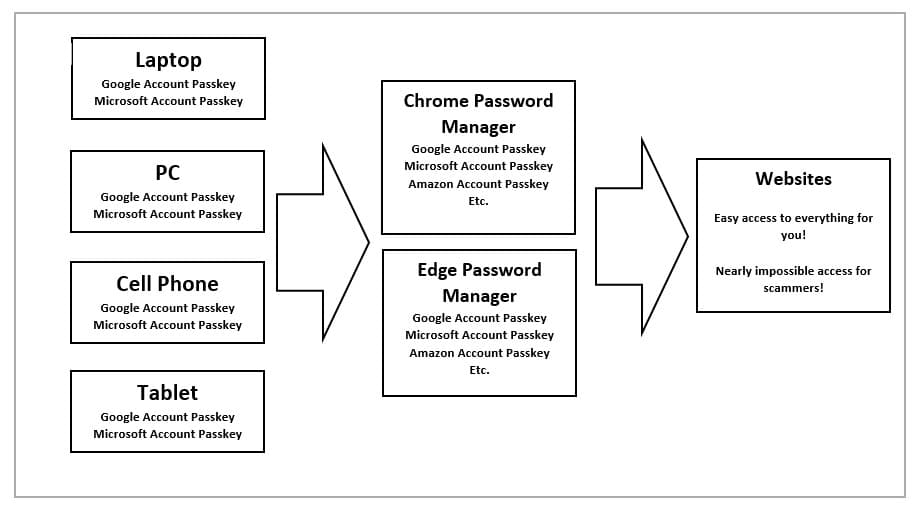
To begin adding passkeys, start with your computer as your first device.
Note that myself, I'm using Windows-Chrome. The specifics of how things unfold during this setup process may be slightly different for each OS-browser combination. In any case, the steps you will need to follow should correspond closely with those below. Remember, whenever you create new PINS or receive recovery codes, always write them down on your template.
Google:
- Go to myaccount.google.com
- On the left, click "Security and Sign in"
- Click "Passkeys and security keys"
- Click "Create a passkey"
- A new window has opened. Click "Create a passkey" here as well.
- This first passkey will save to your Password Manager (specific to your browser). I don't know why one needs a passkey on the password manager, but it's quick and easy so just do it (it's the default on Chrome). You may need to create a PIN for your Password Manager if you have not already done so. Write this PIN down on your paper template. You will enter this PIN whenever you use this passkey. Click "Create".
- Go back to the "Passkeys and security keys" page.
- Click "Create a passkey"
- Click "Create a passkey" on the window that opens.
- Click "Save another way"
- Choose the option associated with your device (in my case, it's Windows Hello). This will save a passkey on your actual device. You will use your device's PIN whenever you use this passkey (or you will use biometric data – like face scan – so sweet!)
- Create passkeys on all of your devices.
Microsoft
- Go to Microsoft.com and login
- Click the circle with the first letter of your name at the top-right.
- Click "View account".
- On the right, click "Security"
- Click "Manage how I sign in"
- Click "Add another way to sign into your account"
- Click "Face, Fingerprint, Pin, or security key".
- In the window that appears, note that it should say "This will be saved to your [] device". Click "Save".
- Let's do another one. Click "Add another way to sign into your account"
- Click "Face, Fingerprint, Pin, or security key".
- Click "Change"
- Click “"Another device". Follow the steps to complete. Repeat this for each of your devices. If this doesn't work for you, be sure to login on your other devices and create passkeys for them that way.
- Let's do one more. Click "Add another way to sign into your account"
- Cick "Face, Fingerprint, Pin, or security key".
- Click "Cancel"
- Choose "Password Manager"
- Click "Create".
Additional Steps↓
There a couple other things to do with Google and Microsoft before moving on.
Google:
- Go to myaccount.google.com
- On the left, click "Security and Sign in"
- Verify that all the numbers you added previously appear on the page: "2-step verification phones"
- Verify that your recovery phone is your cell phone number.
- Verify that you have the correct recovery email (I use my wife's).
- Click "Backup Codes"
- Generate the codes. Print them off or write them down on your paper template.
- Use the Print to PDF function to save a PDF copy of the codes to your device.
- Write down the file name on your paper template.
Microsoft: (optional, but recommended…I did it and everything seems fine)
- Go to Microsoft.com and login
- Click the circle with the first letter of your name at the top-right.
- Click "View account".
- On the right, click "Security"
- Click "Manage how I sign in"
- Scroll down to "Additional Security"
- Turn on Passwordless account and Two-step verification
Set up your Digital Legacy↓
And now for the legacy features. This may be a quick job for those who are fine with default settings. For those wishing to customize legacy profiles (i.e. restricting certain users from certain datasets), this part can take some time. It's recommended that you begin with defaul settings to keep your momenum up, returning later to fine tune your selections. Importantly, one should note here that the built-in legacy features on these platforms do not provide your loved ones with passwords. They're great for ensuring that loved ones do not lose family photos stored in the cloud, and also for providing the executor with important information (e.g. emails) or other documents (e.g. Onedrive/iCloud files). But after setting up these standard features, more can be done to make your executor's life easier. This will be discussed at the end of this module/
Microsoft:
- Click this link, and follow the instructions for adding a legacy contact. Very annoyingly, your contact will need to have a Microsoft account. Only the files in your Onedrive are available to your contact. Your passwords, search history, etc. are not.
Google:
- Go to myaccount.google.com
- On the left, click "Data and Privacy"
- Scroll down to the bottom and click “Make a plan for your digital legacy”
- Click "add data recipient"
- Enter the person's email.
- All 67 datasets are selected by default.
- Scroll down to the bottom and click "Save".
- Repeat to add more emails until you have created enough legacy contacts
You may customize the data which will be available to each legacy contact. Refer to the dropdowns below in which I provide descriptions of what each dataset contains, ideas about how an executor might use the data, and recommendations about whether to include/exclude it for access by a legacy contact. Full disclosure – I used AI to produce this list. There are certainly inaccuracies in the descriptions. However, I've made some edits here and there to make the table more accurate for the more important datasets, and more human.
Customizations are important to protect your privacy and the privacy of others. Four things I will point out here: 1) the Chrome dataset contains your browsing history, 2) your emails or private messages may upset people if they read them, 3) The people you were messaging with might not want others to see their private messages which they sent you, and 4) your photos download will include pictures that you sent to the trash but did not ultimately delete. Accordingly, the choices you make about data access may require careful consideration. You may consider creating a legacy contact for your lawyer, financial advisor, or Certified Executor Advisor — professionals that can access your data impartially, and make objective decisions about who should see what.
Access Log Activity↓
What the data is:
Access Log Activity is a detailed record of when and how your Google Account was accessed. It includes timestamps, IP addresses, device types (phone, computer, smart speaker, etc.), apps or services used during each session, and login methods. The export is typically a large CSV file containing thousands or even hundreds of thousands of entries, covering sign-ins, background syncs, and service interactions over time.
Why an executor might wish they had it:
An executor or legacy contact can use this data to:
- Identify all of the decedent's devices which must now be secured within the estate.
- Reconstruct a timeline of the account holder's final days or weeks.
- Verify whether any access occurred after the person became inactive or passed away, helping detect potential hacking, unauthorized use, or third-party assistance.
- Provide evidence in legal or financial disputes if questions arise about account activity around the time of death or incapacity.
Why an account holder may wish to keep it private:
This log reveals a high-resolution picture of your digital behavior: approximate locations (via IP addresses), daily routines, device usage patterns, and even subtle personal habits. It can feel more invasive than photos or documents because it functions like a detailed access surveillance log. People may prefer to exclude it to avoid exposing this level of metadata to their legacy contact, especially if they value compartmentalizing their privacy even after death. The file is also very large and technical, which can overwhelm executors who just need practical files like emails, photos, and documents.
Recommendation:
A recommendation is difficult to make for this dataset. It will be very useful for investigating perceived untowardness. It also reveals a lot information about the account user's online behaviour. it's a tradeoff.
Alerts↓
What the data is:
Alerts is simply the configuration of your Google Alerts — your personal digital watchlist. The export is a small JSON file that lists every search query or topic you'e set up to monitor (e.g., your name, company, clients, competitors, hobbies, health topics, family members, etc.), plus basic settings like how often you receive notifications. It does not contain the actual alert emails or past results — just the list of things you chose to watch.
Why an executor might wish they had it:
If you actively used Google Alerts for business or professional purposes, the executor can see what you were tracking and recreate the important ones. This can help maintain continuity for brand monitoring, client news, industry developments, or reputation management while settling the estate. For most personal accounts, however, this data has very limited practical value.
Why an account holder may wish to keep it private:
The list can expose sensitive or private topics you were monitoring (e.g., medical conditions, personal reputation concerns, family matters, ex-partners, or confidential business intelligence). Even if nothing dramatic is there, some people simply don't want their executor to see their full “watchlist.”
Recommendation:
Cannot provide a recommendation. Users must consider what their watchlist contains and whether they are comfortable with others reading it. As described above, it may be very useful to executors for ongoing commercial purposes, to the extent that the watchlist was used.
Android Device Configuration Service↓
What the data is:
This export contains a technical inventory of every Android device linked to your Google Account with some information about device specs.
Why an executor might wish they had it:
An executor can use this to:
Build a complete inventory of Android devices (phones, tablets, watches, etc.) to locate, secure, sell, or wipe physical hardware.
Recommendation:
Include it. This is practical, low-risk technical data that helps executors handle physical devices. It contains almost no sensitive personal content
Arts and Culture↓
What the data is:
Arts & Culture exports your personal activity on the Google Arts & Culture app and website. It includes:
Favorites: A list (usually HTML) of artworks, exhibits, artists, museums, or cultural items you have favorited or saved.
Galleries: Any custom galleries or collections you have created (exported as CSV), including the artworks, descriptions, and organization you added.
It does not include your full browsing history on the platform, private notes (if any), or content created by others — only what you have explicitly saved or built yourself.
Why an executor might wish they had it:
An executor can:
Preserve your curated cultural interests, favorite artworks, or personal collections as part of your digital legacy (nice for family members who want to understand or continue your hobbies).
Access any galleries you created that might have sentimental, educational, or even small commercial value.
Get insight into your personal tastes in art, history, or culture, which can help with memorializing you or distributing related physical items (e.g., art books, museum memberships).
This is mostly sentimental or hobby-related data.
Why an account holder may wish to keep it private:
The list of favorites and custom galleries can reveal very specific personal interests.
Recommendation:
Include it. It may be a nice-to-have for legacy purposes if you actively use Google Arts & Culture.
Assignments↓
What the data is:
Assignments contains your Google Classroom data — courses, assignments you created or submitted, student work, grades, feedback, and rubrics.
Why an executor might wish they had it:
It preserves teaching materials, lesson plans, or academic work that may have professional or sentimental value.
Why an account holder may wish to keep it private:
This data may includes other people's private information — student names, homework, grades, and comments.
Recommendation:
None.
Blogger↓
What the data is:
Blogger exports the full content of every blog you own or administer. It includes:
Posts and pages (in Atom XML format via feed.atom)
Comments (including commenter details)
Blog themes/templates (theme-layouts.xml)
Uploaded images, videos, and attached files
Blog settings, followers (if admin), and some metadata
The export is a ZIP file with folders for each of your blogs.
Why an executor might wish they had it:
An executor can:
Preserve your written legacy, personal blog, family history, or business blog.
Migrate the entire blog to another platform or new Blogger account.
Access published content, comments, and themes for archiving, sharing with family, or continuing the blog.
Why an account holder may wish to keep it private:
Your blog posts and comments may contain sensitive info.
Recommendation:
Include it. Information on Blogger has generally been made public anyway.
Calendar↓
What the data is:
Calendar exports all your Google Calendars as .ics files (standard calendar format). It includes:
Events with titles, descriptions, locations, times, and recurring patterns
Attendees, reminders, attachments, and notes
All calendars you own or have access to (personal, work, shared, etc.)
Why an executor might wish they had it:
An executor can:
See upcoming or recurring important dates, bills, subscriptions, anniversaries, or deadlines that need attention after your passing.
Identify key contacts through meeting attendees or event details.
Understand your schedule, routines, and obligations to help settle the estate smoothly (e.g., appointments that should be cancelled or followed up).
This is one of the more practically useful categories for day-to-day estate management. Although, it won't be available to the executor for at least three months, depending on your digital legacy specifications (i.e. release data after X months of inactivity).
Why an account holder may wish to keep it private:
Calendars often contain highly personal or sensitive information — medical appointments, private meetings, family matters, therapy sessions, confidential work discussions, or romantic plans. It can reveal a very intimate picture of your daily life and relationships.
Recommendation:
Include it.
Chrome↓
What the data is:
Chrome exports your synced browser data from Google. It typically includes:
Bookmarks (all folders and links)
Browsing history
Autofill data (addresses, payment methods if synced, forms)
Note: Saved passwords are not included here.
Why an executor might wish they had it:
An executor can:
Recover important bookmarks (e.g., banking sites, account logins, research, family resources).
Review recent browsing history to understand open matters, subscriptions, or unfinished tasks.
Rebuild useful browser settings and autofill data to access websites or continue digital tasks.
Why an account holder may wish to keep it private:
Browsing history and autofill data can be highly revealing — they show websites visited, searches, shopping habits, medical lookups, private interests, and more. Bookmarks may include sensitive or embarrassing links. This category often feels very personal.
Recommendation:
None.
Classroom↓
What the data is:
Classroom exports your full Google Classroom data (separate from the "Assignments" item). It includes:
Class details (title, description, room, calendar link, Drive folder info)
Classwork: announcements, posts, assignments, questions, topics, and materials
People lists (teachers, students, guardians and their roles)
Grade categories and settings
For teachers: student submissions, comments, grades, and rubrics (overlaps with Assignments)
It is delivered as JSON/HTML files with folders for each class.
Why an executor might wish they had it:
An executor can preserve teaching materials, class records, or student work that has professional or sentimental value. Useful for educators winding down their career or leaving behind lesson plans and course history.
Why an account holder may wish to keep it private:
This data frequently contains other people's private information — especially student names, submissions, grades, and feedback. Sharing it raises privacy, ethical, and potential legal issues.
Recommendation:
none.
Contacts↓
What the data is:
Contacts exports your entire Google Contacts list as .vcf (vCard) files. It includes:
Names, phone numbers, email addresses
Physical addresses, birthdays, anniversaries
Notes, organization/job titles, websites, and custom fields
Contact photos (if saved)
All groups/labels you created
Why an executor might wish they had it:
An executor can:
Reach out to important people (friends, family, colleagues, doctors, lawyers, financial advisors, etc.) when settling the estate.
Notify contacts about your passing or funeral arrangements.
Find key relationships and contact details that aren't obvious from other data (e.g., Calendar or Mail).
Preserve family history or professional networks.
This could be one of the most practically useful categories for estate administration.
Why an account holder may wish to keep it private:
Your contacts list can reveal very personal relationships, including ex-partners, therapists, private friends, business associates, or sensitive professional connections. Notes fields sometimes contain highly private comments about people. There may also be privacy/legal issues with handing this off to another person.
Recommendation:
none.
Discover↓
What the data is:
Discover exports your personalization settings for Google's personalized news and content feed (the “Discover” tab on Android/Google apps). It includes:
Topics, sites, or entities you follow
Articles or content you have liked / positively interacted with
Sources or topics you marked as “Not interested”
It is a small file (usually JSON or similar) containing your content preference profile — not your full browsing or reading history.
Why an executor might wish they had it:
An executor can see what kinds of news, topics, or content you were interested in.
Why an account holder may wish to keep it private:
It reveals a picture of your interests, political leanings, etc.
Recommendation:
none
Drive↓
What the data is:
Drive exports all files and folders you own in Google Drive (My Drive). This is often one of the largest parts of a Takeout export. It includes:
All documents, spreadsheets, presentations, PDFs, photos, videos, and other files
Google native files (Docs, Sheets, Slides, etc.) exported in your chosen format (e.g., Word, Excel, PDF)
Folder structure, file versions (for some files), and metadata (creation/modification dates, sharing settings via accompanying JSON files)
Files you've added to Drive from shared locations
Note: Files only shared with you (not added to your Drive) and files in Shared Drives you don't own are generally not included.
Why an executor might wish they had it:
This is often the most valuable category for an executor. It contains:
Important documents, Family photos/videos, personal projects, possibly estate documents like wills, etc.
Why an account holder may wish to keep it private:
Documents may contain private or embarrassing information.
Recommendation:
Include it (with preparation).
Drive is usually the highest-priority data for a spouse/executor to receive. However, before enabling legacy access, review and clean up anything extremely sensitive or move it elsewhere. For most people in a trusting relationship, this should be included.
Fit↓
What the data is:
Fit exports your Google Fit health and fitness data. It typically includes:
Daily summaries: steps, distance, calories burned, active minutes, heart points
Activity and workout logs (often in TCX and CSV format, including routes with location data for some workouts)
Health metrics: weight, height, heart rate, sleep data (if tracked), and other measurements (blood pressure, etc. if entered)
Goals, achievements, and connected device/app history
Recommendation:
Exclude it. This is very unlikely to be useful for anything.
Fitbit↓
What the data is:
Fitbit exports your complete health and fitness data from the Fitbit service (now integrated with Google). It includes:
Daily activity summaries (steps, distance, floors, calories, active minutes)
Detailed workout/exercise logs with heart rate, GPS routes (where available)
Sleep data (stages, duration, quality)
Heart rate readings (intraday and resting)
Weight, body measurements, food logs, stress/mindfulness data
Profile information, account changes, device history, and more (often in JSON/CSV format with many dated folders)
Recommendation:
Exclude it. This is very unlikely to be useful for anything.
Flow↓
What the data is:
Flow refers to Google Flow (Google's experimental AI creative tool in Google Labs, powered by models like Veo for video and image generation). The export includes:
Your generated videos, images, and other AI creations
Prompts and project files you've worked on
Generation history and metadata
Why an executor might wish they had it:
An executor can preserve your creative AI projects, artistic experiments, or any meaningful/fun generations you made.
Why an account holder may wish to keep it private:
AI-generated content often includes personal, humorous, experimental, or private prompts.
Recommendation:
none.
Gemini↓
What the data is:
Gemini exports your interactions with Google's AI (formerly Bard). It primarily includes:
Full conversation history (prompts you sent and Gemini's responses)
Generated content (text, images, files, or other media you created in chats)
Uploaded files you shared with Gemini
Gemini Gems (custom versions of Gemini you created) and related settings
Data is typically in HTML or JSON format, often with a folder structure for chats and media.
Recommendation:
Exclude.
Google Account↓
What the data is:
Google Account exports a simple summary of major account changes over the lifetime of your Google Account (in your case, back to 2011). It consists of a single table with these fields:
Timestamp
IP Address
Change Type (most commonly Password changes, Service Added, Service Removed)
Old Value
New Value
It also includes your Google email address and Google Account ID (a 12-digit number). The entire export is usually just one page.
Why an executor might wish they had it:
An executor can:
Check for certain kinds of account activity.
Overall, it is a relatively low-value dataset due to its limited scope. The Access Log Activity dataset will be vastly superior in providing information (particularly where there is concern that someone else is accessing the account).
Why an account holder may wish to keep it private:
No reason really. There's very little information here.
Recommendation:
Include it.
Google Ads↓
What the data is:
Google Ads exports your advertising account data if you have ever run campaigns (personal or business). It typically includes:
Campaign settings, ad groups, keywords, and ad creatives
Performance reports and statistics (clicks, impressions, costs)
Billing and payment history
Audiences, extensions, and targeting settings
Conversion tracking data
For most personal users who never ran Google Ads, this export is empty or very small.
Why an executor might wish they had it:
An executor can:
Review any active or past advertising campaigns (useful if you ran ads for a business, side hustle, or personal project).
Access billing records or performance data relevant to business valuation or closing accounts.
Help wind down or transfer any paid advertising activities.
Why an account holder may wish to keep it private:
Can't think of anything!
Recommendation:
Include it. It's usually low-volume and practical for business-related estates.
Google Business Profile↓
What the data is:
Google Business Profile (formerly Google My Business) exports all data associated with your business listing(s) on Google Maps and Search. It typically includes:
Business information (name, address, phone, hours, categories, attributes)
Posts and updates you published
Photos and videos you uploaded
Reviews and your replies to them (in JSON format)
Performance metrics, Q&A, and other profile settings
Why an executor might wish they had it:
An executor can:
Preserve or transfer the business listing if you owned/operated a business.
Access reviews, posts, and photos for continuity, sale of the business, or estate valuation.
Handle customer communications or maintain the online presence during probate.
This is especially relevant for small business owners, freelancers, or anyone with a public business profile.
Why an account holder may wish to keep it private:
Can't think of anything!
Recommendation:
Include it
Google Chat↓
What the data is:
Google Chat exports your chat history and related information. It includes:
Messages from direct messages (DMs), group chats, and Spaces
Attachments (photos, files, etc.)
Membership details (who you chatted with or were in groups/spaces with)
Your user profile information within Chat
Data is typically exported as JSON files with folders for different conversations, plus attached media files.
Why an executor might wish they had it:
An executor can:
Review important conversations, work discussions, or personal messages.
Access shared files.
Why an account holder may wish to keep it private:
Google Chat often contains highly personal or sensitive conversations — private family matters, work discussions, emotional exchanges, or confidential topics. It can feel very intimate, similar to reading someone's text messages.
Recommendation:
Exclude it. One must consider that chat histories contain the private thoughts of both yourself and your counterparty. You don't have their permission to share this with anyone else.
Google Cloud Search↓
What the data is:
Google Cloud Search exports data from Google's enterprise search tool (mainly used in Google Workspace organizations). It typically includes:
Content metadata ingested during indexing (from Drive, Gmail, Sites, etc.)
Search applications and configurations
Datasource schemas and identity sources
User search activity, clicks, and homepage views
For most personal (non-business/Workspace) accounts, this export is empty or very small.
Why an executor might wish they had it:
An executor can review any enterprise-level search setups or indexed content if you worked in or managed a Google Workspace environment. This may help with business continuity, understanding internal knowledge bases, or transferring admin responsibilities.
Why an account holder may wish to keep it private:
It can contain metadata from work documents, emails, and internal company information. This often involves sensitive organizational or business data that should not be shared outside the company.
Recommendation:
Include it.
Google Developers↓
What the data is:
Google Developers exports data from your Google Developer accounts, primarily covering Google Play Console, Google Cloud Console, and other developer-related services. It typically includes:
Developer profile and account settings
App/project listings and metadata (if you published Android apps or used Firebase/Cloud projects)
Some billing, reports, or configuration data tied to your developer identity
Why an executor might wish they had it:
An executor can:
Access or transfer any published apps, developer projects, or Cloud resources.
Handle billing, payouts, or account closure for developer activities.
Preserve app-related assets if you had a side project or small business involving Android apps.
Why an account holder may wish to keep it private:
Can't think of anything!
Recommendation:
Include it. Digital assets may have value.
Google Earth↓
What the data is:
Google Earth exports your saved content and projects from Google Earth (web, desktop Pro, or mobile). It typically includes:
My Places / placemarks, polygons, paths, and custom maps you created
Why an executor might wish they had it:
An executor can:
Preserve any maps, travel plans, family history projects, property research, or hobby-related geographic content you created.
Recommendation:
Include it. This is generally low-risk, creative/hobby data with good sentimental value.
Google Feedback↓
What the data is:
Google Feedback exports the feedback reports and suggestions you have submitted to Google across their products (via the “Send feedback” option in apps like Chrome, Android, Gmail, Maps, etc.). It typically includes:
Your submitted feedback messages
Why an executor might wish they had it:
Can't think of anything.
Why an account holder may wish to keep it private:
Possibly embarrassing.
Recommendation:
Exclude it. The data is likely of no practical benefit.
Google Finance↓
What the data is:
Google Finance exports your personal investment tracking data, including:
Watchlists (stocks, ETFs, indices you follow)
Custom portfolios with holdings and performance notes
Saved symbols and any personal notes you added
It is essentially your personal stock/investment tracking lists — not actual brokerage account balances or transaction history.
Why an executor might wish they had it:
Can't think of anything.
Why an account holder may wish to keep it private:
Can't think of anything.
Recommendation:
none.
Google Help Communities↓
What the data is:
Google Help Communities exports your contributions to Google's product support forums (e.g., Gmail Help, Android Help, etc.). It includes:
Questions you asked
Answers/replies you posted
Why an executor might wish they had it:
Can't think of anything.
Why an account holder may wish to keep it private:
Can't think of anything.
Recommendation:
none.
Google Meet↓
What the data is:
Google Meet exports your meeting history and related activity. It typically includes:
List of meetings you hosted or joined (with titles, dates, times, and durations)
Meeting metadata (participants, links, Calendar event IDs)
Chat messages/transcripts from meetings (if saved)
Any recordings you hosted (usually links or references — actual video files are often stored in Drive)
It does not include every recording (those live in Drive) or full attendance reports for all meetings.
Why an executor might wish they had it:
An executor can:
See recent or recurring meetings, calls with lawyers, doctors, financial advisors, or family.
Identify important business or personal discussions that may need follow-up.
Locate any saved transcripts or meeting notes relevant to the estate.
Why an account holder may wish to keep it private:
Meeting history can reveal highly personal or sensitive conversations — medical appointments, therapy sessions, private family matters, confidential work calls, or romantic relationships.
Recommendation:
none.
Google One↓
What the data is:
Google One exports your subscription and support-related data. It typically includes:
Redeemed benefits (e.g., special offers, promotions, or member perks with dates)
Support conversation history (your chats or requests with Google One support, including issue descriptions and related products)
Why an executor might wish they had it:
Can't think of anything.
Why an account holder may wish to keep it private:
Can't think of anything.
Recommendation:
none.
Google Pay↓
What the data is:
Google Pay exports your payment and transaction activity. It typically includes:
Transaction history (purchases, transfers, refunds)
Saved payment methods (cards, bank accounts — often last 4 digits + expiration)
Activity logs, receipts, and saved items (loyalty cards, tickets, passes)
Payment requests sent/received and related details (usually in JSON/CSV/HTML format)
Why an executor might wish they had it:
An executor can:
Review recent or recurring transactions to identify bills, subscriptions, or outstanding payments that need attention.
Locate active payment methods that should be cancelled or transferred.
Spot any unusual activity or unresolved financial matters.
Why an account holder may wish to keep it private:
It reveals detailed spending habits.
Recommendation:
Include it. This provides valuable financial clues for your spouse or executor, especially for closing accounts and managing the estate.
Google Photos↓
What the data is:
Google Photos exports your entire photo and video library. This is often one of the largest parts of a Takeout export. It includes:
All photos and videos you've uploaded or backed up
Album organization and shared albums you created
Metadata (dates, locations, facial recognition groups if enabled)
Favorites, archive, and trash items.
Why an executor might wish they had it:
Photos are often the most important digital assets to survivors.
Why an account holder may wish to keep it private:
Note that "trash items" may include photos that you thought were deleted and gone forever. There may be embarrassing photos in this dataset.
Recommendation:
Include it.
Google Play Books↓
What the data is:
Google Play Books exports your books and related activity from Google Play Books. It includes:
All books you purchased, uploaded, or added to your library (PDFs and EPUBs) along with notes/annotations.
Why an executor might wish they had it:
An executor can:
Preserve your personal digital library (especially if you have many purchased or uploaded books).
Access any notes, highlights, or annotations you made (which can be sentimental or contain important thoughts).
Why an account holder may wish to keep it private:
Your library and especially any notes/highlights can reveal private or embarrassing things.
Recommendation:
Include it. This is generally low-risk and has good sentimental/practical value.
Google Play Games↓
What the data is:
Google Play Games Services exports your gaming profile and activity across Android games that use Google Play Games. It typically includes:
Your player profile (username, avatar, stats)
Game save data and progress for supported games
other info
Why an executor might wish they had it:
An executor can:
Potentially help transfer or close gaming accounts.
Why an account holder may wish to keep it private:
Can't think of anything.
Recommendation:
Include it.
Google Play Movies↓
What the data is:
Google Play Movies & TV exports your digital video library. It includes:
All movies and TV episodes you have purchased or rented
The actual video files are not exported (due to licensing restrictions). You get a list of your titles with download links or references where available.
Why an executor might wish they had it:
An executor can:
Can't think of anything
Why an account holder may wish to keep it private:
It reveals your taste in movies and TV (including any adult, niche, or embarrassing content you purchased). Some people prefer to keep their entertainment habits private.
Recommendation:
none.
Google Play Store↓
What the data is:
Google Play Store exports your activity and library from the Google Play Store. It typically includes:
Purchase history and order records (apps, in-app purchases, subscriptions)
Library of installed/purchased apps
other items
Why an executor might wish they had it:
An executor can:
Identify active or recurring subscriptions and purchases that need to be cancelled.
Review paid apps or in-app content that may need transferring or noting for family.
Why an account holder may wish to keep it private:
Potentially private information revealed.
Recommendation:
Include it. This is practical financial and subscription-related data that helps your executor close out recurring charges.
Google Podcasts↓
What the data is:
Google Podcasts exports your podcast-related data. It typically includes:
Subscriptions (list of podcasts you followed, usually in OPML format — easy to import into other podcast apps)
Listening history or progress on episodes (if available)
Queued episodes or saved items
Note: Google Podcasts was discontinued in 2024 and migrated to YouTube Music, so this data is mostly historical.
Recommendation:
none.
Google Product Surveys↓
What the data is:
Google Product Surveys exports your participation history in Google's opinion/reward surveys. It typically includes:
Surveys you've completed or started
Questions and your responses/answers
Reward or credit history (e.g., Google Play credit earned)
Demographic information you provided during surveys
Why an executor might wish they had it:
An executor can:
Possibly claim outstanding rewards.
Why an account holder may wish to keep it private:
Potentially private information revealed.
Recommendation:
none
Google Shopping↓
What the data is:
Google Shopping exports your shopping activity and saved items. It typically includes:
Order history and receipts (purchases made through Google Shopping or merchant partners)
Saved items, wish lists, and shopping lists
Other info
Why an executor might wish they had it:
An executor can:
Review recent or recurring purchases to identify subscriptions, warranties, or deliveries that need attention.
Why an account holder may wish to keep it private:
It reveals detailed spending habits.
Recommendation:
Include it.
Google Store↓
What the data is:
Google Store exports your purchase history and activity from the official Google Store (hardware, accessories, Pixel phones, Nest devices, etc.). It typically includes:
Order history and receipts (purchases, returns, cancellations)
Product details, shipping addresses, and order status
Subscriptions or service plans tied to hardware
Why an executor might wish they had it:
An executor can:
Track recent or outstanding hardware purchases, warranties, or returns that need attention.
Locate important devices (e.g., Pixels, Nest hubs, Pixel Buds) for inventory or resale.
Handle any active subscriptions or support claims related to Google hardware.
Why an account holder may wish to keep it private:
It reveals what Google hardware and accessories you own, spending habits on tech products, and shipping addresses — which some people consider moderately personal.
Recommendation:
Include it.
Google Wallet↓
What the data is:
Google Wallet exports your digital wallet contents and activity. It typically includes:
Saved payment cards (last 4 digits, card type, expiration)
Passes, tickets, boarding passes, loyalty cards, IDs, and event tickets
Transaction history and receipts (some overlap with Google Pay)
Saved items and offers
Wallet settings and activity logs
Why an executor might wish they had it:
An executor can:
Identify active payment methods, loyalty programs, or tickets that need cancellation or redemption.
Locate important digital items like event tickets, insurance cards, or transit passes.
Review recent transactions for any unresolved financial matters.
This helps with practical financial and administrative cleanup.
Why an account holder may wish to keep it private:
It reveals your payment methods, spending patterns (via transactions), and what digital items you carry (loyalty cards, tickets, etc.). This can feel quite personal regarding your finances and daily habits.
Recommendation:
Include it.
Google Workspace Marketplace↓
What the data is:
Google Workspace Marketplace exports information about the add-ons and apps you have installed or interacted with from the Google Workspace Marketplace. It typically includes:
List of installed Marketplace apps/add-ons (for Gmail, Docs, Sheets, Drive, etc.)
App details, purchase/subscription records (if any paid apps)
Installation history and basic usage metadata
For most personal users who don't use Workspace add-ons, this export is empty or very small.
Why an executor might wish they had it:
An executor can:
See which productivity tools or add-ons you relied on for work or personal projects.
Help transfer, renew, or replace any paid Marketplace apps during estate settlement.
Understand your workflow tools if you used Workspace heavily for business or side projects.
Why an account holder may wish to keep it private:
Can't think of anything.
Recommendation:
Include it.
Google Groups↓
What the data is:
Google Groups exports your activity and ownership data from Google Groups (both consumer googlegroups.com and any Workspace/domain groups). It typically includes:
Information about you: groups you belong to, posts you made, favorite messages/groups, recent activity.
Information about groups you own/admin: group settings, members list (if you're an owner), email templates, etc.
Links to posts and activity (actual full message archives may be limited depending on your role).
Why an executor might wish they had it:
An executor can:
Identify online communities, professional groups, or hobby forums you were active in.
Preserve or transfer ownership of any groups you managed (useful for business, family, or community groups).
Understand your social/professional networks and any ongoing discussions that may need attention.
Why an account holder may wish to keep it private:
It can reveal your membership in sensitive or private groups (support groups, political, health-related, alumni, etc.), your posted opinions, and full member lists if you own groups. Group activity can expose personal interests or confidential discussions.
Recommendation:
Include it. It's generally low-to-medium risk and can provide helpful context about your online communities.
Home App↓
What the data is:
Home App exports data from the Google Home app (smart home control for Nest, Google Home devices, Chromecast, etc.). It typically includes:
Device list (smart speakers, displays, lights, thermostats, cameras, etc.)
Home and room structures (how you organized your house/apartment)
Automation routines and scenes
Activity/history logs (some device usage events)
Settings and configuration details
Why an executor might wish they had it:
An executor can:
Create a complete inventory of smart home devices to locate, reset, or sell physical hardware.
Understand your home layout and automations (helpful for family members taking over the house).
Revoke access or factory reset devices tied to your account.
This is particularly useful if you have a smart home setup with multiple Nest/Google devices.
Why an account holder may wish to keep it private:
It reveals your home layout, which specific smart devices you own (including cameras and microphones), and usage patterns of those devices. Some people consider smart home configurations and history moderately private.
Recommendation:
Include it. This is practical, technical data that helps your executor manage physical smart home assets.
Google Keep↓
What the data is:
Google Keep exports all your notes and lists. It includes:
All notes (text, lists, drawings, audio recordings, images)
Labels, colors, and organization
Reminders and archived notes
Collaborators and sharing settings
Exported as HTML files (easy to read) plus JSON metadata and any attached images/audio.
Why an executor might wish they had it:
An executor can:
Access quick notes, shopping lists, passwords, instructions, or “final wishes” you may have written.
Find important reminders, to-do lists, or information that isn't stored in Drive or Calendar.
Preserve sentimental notes, ideas, or family-related content.
Google Keep is often where people keep casual but important information.
Why an account holder may wish to keep it private:
Notes can be very personal or raw — random thoughts, private lists, health notes, relationship reflections, or half-finished ideas. It can feel like reading someone's private scratchpad or journal.
Recommendation:
Include it. This is one of the more useful everyday categories. Many people store practical information here (password hints, instructions for the family, etc.).
Mail↓
What the data is:
Mail exports your entire Gmail account. This is usually one of the largest and most important parts of a Takeout export. It includes:
All emails (Inbox, Sent, Drafts, Trash, Spam, and every label/folder)
Email attachments and embedded images
Chat history (if you used Google Chat/Hangouts inside Gmail)
Filters, signatures, vacation responder settings, and some account configuration
Exported as .mbox files (standard email format) plus separate folders for attachments.
Why an executor might wish they had it:
An executor can:
Find important financial, legal, or personal information (account statements, insurance policies, tax documents, instructions, etc.).
Locate passwords, recovery codes, or references to other accounts.
Notify people about your passing and handle ongoing correspondence.
Understand your relationships, obligations, and unfinished business.
For most people, Gmail is one of the highest-value categories for estate settlement.
Why an account holder may wish to keep it private:
This is the most sensitive category in Google Takeout. It contains highly personal, intimate, or confidential communications — medical records, financial details, relationship issues, private thoughts, work secrets, and messages from others. Reading someone's full email history can feel very intrusive.
Recommendation:
Include it — but with strong preparation. This is one of the most useful items for your wife/executor, but it's also the riskiest. Best practice: Review and delete/archive anything extremely private before enabling legacy access.
Maps↓
What the data is:
Maps exports your personal Google Maps data. It typically includes:
Your Places: Saved locations, labeled places (Home, Work, favorites, etc.)
Maps you created or contributed to
Shared locations and location sharing history
Some map settings and preferences
Note: This is separate from the next item “Maps (your places)”, which is more detailed.
Why an executor might wish they had it:
An executor can:
Find saved locations (home, work, family members, storage units, safe deposit boxes, etc.).
Understand frequently visited or important places.
Locate any custom maps or shared location history that might help with estate matters.
This is useful for practical location-based tasks.
Why an account holder may wish to keep it private:
Saved places and location data can reveal your routines, favorite spots, private addresses, and personal relationships (e.g., frequently visited homes of friends or partners).
Recommendation:
Include it. This is practical, relatively low-risk data.
Maps (your places)↓
What the data is:
Maps (your places) exports a detailed record of your personal contributions and saved content in Google Maps. It typically includes:
All your saved places with custom labels and notes
Reviews you've written (including private drafts)
Photos and videos you contributed to places
Edits and contributions to business listings or maps
Your personal map layers and created content
Exported as JSON, KML, and HTML files.
Why an executor might wish they had it:
An executor can:
Find important saved locations (safe deposit boxes, storage units, family properties, favorite spots, etc.) with your personal notes.
Review any reviews or photos you contributed that might have sentimental or practical value.
Understand places that were meaningful to you.
This complements the simpler “Maps” export with more personal details.
Why an account holder may wish to keep it private:
It can reveal very specific personal locations, private notes about places, relationships (e.g., "Sarah's house"), and opinions in reviews. The combination of saved places and contributed photos can feel quite personal.
Recommendation:
Include it.
Messages↓
What the data is:
Messages exports your SMS, MMS, and RCS text message history from the Google Messages app on Android. It typically includes:
Text conversations (sent and received messages)
Group chats
MMS attachments (photos, videos, audio messages)
Timestamps and contact information
Exported as HTML or JSON files with attached media.
Note: This only includes messages backed up to Google (via Messages backup). It does not include iMessage, WhatsApp, or other third-party messaging apps.
Why an executor might wish they had it:
An executor can:
Review important recent conversations, instructions, or arrangements.
Find practical information (e.g., appointments, financial details, or final messages).
Preserve sentimental messages from family or friends.
Why an account holder may wish to keep it private:
Text messages are often highly personal — they can contain intimate conversations, private photos, arguments, medical discussions, or sensitive information shared with others. This is one of the more intimate categories.
Recommendation:
Include with caution. It can be very useful for a spouse/executor to see recent communications, but it's also quite personal.
My Activity↓
What the data is:
My Activity is a broad, detailed export of your Google activity history across dozens of services. It includes (in JSON/HTML format, organized by product):
Search history (Google Search queries)
YouTube watch and search history
App and device activity (Android app launches, usage)
Chrome browsing history
Maps activity and places visited
Assistant voice commands
Play Store activity, purchases, and more
It is essentially the full log of what you've done with Google products — one of the largest and most revealing categories.
Why an executor might wish they had it:
An executor can:
Find clues about accounts, subscriptions, or unfinished tasks.
Understand your digital habits and routines.
It can serve as a broad “activity timeline” when other categories are limited.
Why an account holder may wish to keep it private:
This is one of the most privacy-sensitive categories. It reveals your searches, videos watched, apps used, browsing habits, and interests in great detail — including potentially embarrassing, private, or sensitive topics (health, relationships, politics, etc.).
Recommendation:
Exclude it in most cases. While it can provide some context, the privacy cost is very high and the practical value for an executor is lower than categories like Mail, Drive, Calendar, or Photos. Most people should leave this unchecked unless you have a very high-trust relationship and want maximum transparency.
My Maps↓
What the data is:
My Activity is a broad, detailed export of your Google activity history across dozens of services. It includes (in JSON/HTML format, organized by product):
Search history (Google Search queries)
YouTube watch and search history
App and device activity (Android app launches, usage)
Chrome browsing history
Maps activity and places visited
Assistant voice commands
Play Store activity, purchases, and more
It is essentially the full log of what you've done with Google products — one of the largest and most revealing categories.
Why an executor might wish they had it:
An executor can:
Reconstruct your recent interests, searches, and activities for context.
Find clues about accounts, subscriptions, or unfinished tasks.
Understand your digital habits and routines.
It can serve as a broad “activity timeline” when other categories are limited.
Why an account holder may wish to keep it private:
This is one of the most privacy-sensitive categories. It reveals your searches, videos watched, apps used, browsing habits, and interests in great detail — including potentially embarrassing, private, or sensitive topics (health, relationships, politics, etc.).
Recommendation:
Exclude it in most cases. While it can provide some context, the privacy cost is very high and the practical value for an executor is lower than categories like Mail, Drive, Calendar, or Photos. Most people should leave this unchecked unless you have a very high-trust relationship and want maximum transparency.
Nest↓
What the data is:
Nest exports detailed data from your Google Nest / Google Home smart home devices (thermostats, cameras, smoke detectors, hubs, etc.). It typically includes:
Device settings and configurations
Historical sensor readings (temperature, humidity, motion, smoke/CO levels, etc.) — often in 15-minute increments going back years
Activity logs and event history (e.g., when heating/cooling ran, camera events)
Camera clips or images (if applicable)
Home/Room structures and automations
This can be a very large export if you have multiple devices with long histories.
Why an executor might wish they had it:
An executor can:
Create a full inventory of smart home devices for locating, resetting, or selling them.
Understand home usage patterns (temperature history, energy use, security events) that may help with house management or final activities.
Access any meaningful camera footage or logs from the period around incapacity/death.
Why an account holder may wish to keep it private:
This data reveals intimate details about your home life — daily routines, when you're home/asleep, temperature preferences, energy usage, and any camera recordings. It can feel like a surveillance log of your private living space.
Recommendation:
Include it if you have Nest/Google Home devices. It's practical for managing physical smart home assets and provides useful context. While detailed, the data is mostly technical/sensor-based rather than deeply emotional.
News↓
What the data is:
News exports your personalization data from Google News. It typically includes:
Followed topics, sources, and publishers
Saved or liked articles
“Not interested” or hidden sources/topics
Reading history and preferences (if enabled)
Custom news settings and notifications
It is usually a small JSON/HTML export showing your news “bubble” and interests.
Why an executor might wish they had it:
An executor can:
Understand what news topics, sources, and issues you cared about.
Recreate similar news feeds for family or continue monitoring important topics.
Gain insight into your interests, values, or professional focus.
This has mostly sentimental or contextual value.
Why an account holder may wish to keep it private:
It reveals your political leanings, health concerns, hobbies, financial interests, or other personal curiosities through the topics and sources you followed or engaged with. Some people prefer to keep their news consumption habits private.
Recommendation:
Include it.
Personal Safety↓
What the data is:
Personal Safety exports data from Google's Personal Safety app (the safety features on Pixel phones and Android). It typically includes:
Safety Check recordings and check-ins
Video/audio recordings made during safety events (often MP4 files)
Emergency contacts, location sharing history, and crash/sensor incident logs
Car crash detection data or other safety alerts you've triggered
This is usually a relatively small export focused on incident-related media and logs.
Why an executor might wish they had it:
An executor can:
Access any recorded safety incidents or final moments (e.g., if a crash or emergency occurred).
Review emergency contact settings and location-sharing history for context.
Preserve any meaningful recordings tied to personal safety events.
This is mainly relevant if you actively use safety features.
Why an account holder may wish to keep it private:
These recordings and logs can be highly sensitive — they may capture personal emergencies, medical events, arguments, or private moments during safety checks. It can feel very intimate or distressing.
Recommendation:
Include it.
Phone Recordings↓
What the data is:
Phone Audio exports your phone audio recordings and transcriptions. This primarily includes:
Audio recordings made with the Google Recorder app (on Pixel phones)
Automatic or manual transcriptions of those recordings
Metadata (dates, durations, titles)
It is usually exported as MP3 audio files + text transcription files (often in ZIP format).
Why an executor might wish they had it:
An executor can:
Access any important voice memos, meeting recordings, interviews, lectures, or personal notes you recorded.
Review transcriptions for quick reference (e.g., instructions, ideas, or final wishes).
Preserve sentimental or practical audio content.
This is especially useful if you frequently use the Recorder app for notes or documentation.
Why an account holder may wish to keep it private:
These recordings can be highly personal — private thoughts, therapy sessions, family conversations, medical notes, or confidential discussions. Listening to someone's voice recordings after death can feel very intimate or emotional.
Recommendation:
Include it if you actively use the Google Recorder app. It can contain valuable practical or sentimental audio.
Pinpoint↓
What the data is:
Pinpoint exports your data from Google Pinpoint (Google's free AI-powered research tool for journalists and researchers). It includes:
All documents, PDFs, images, audio, and video files you uploaded to your collections
Extracted text, transcriptions, OCR results, and structured data you generated
Notes, highlights, tags, and search queries within your projects
Collection metadata and any exported spreadsheets
Exported mainly as ZIP files containing your uploaded originals plus processed data.
Why an executor might wish they had it:
An executor can:
Preserve important research projects, investigative work, or document collections (especially valuable if you're a journalist, academic, writer, or researcher).
Access transcriptions, extracted data, or notes that may contain key information for the estate.
Understand ongoing or unfinished research projects.
Why an account holder may wish to keep it private:
Pinpoint collections often contain sensitive source documents, confidential research, interview transcripts, or private notes. Uploading third-party documents may also raise copyright or privacy issues regarding other people's information.
Recommendation:
Include it.
Pixel↓
What the data is:
Pixel exports device-specific data and settings from your Google Pixel phones (and sometimes Pixel tablets). It typically includes:
Device settings and configurations
Call history and voicemail (if backed up)
Some system logs or diagnostic data
Pixel-specific features data (e.g., certain camera settings, Now Playing history, or other exclusive Pixel tools)
It is usually a relatively small export focused on hardware-level or Pixel-exclusive information.
Why an executor might wish they had it:
An executor can:
Understand the exact configuration of your Pixel device(s) for factory reset, transfer, or troubleshooting.
Access call history or other phone-related logs that might help with final communications or estate matters.
Inventory Pixel hardware details more thoroughly.
This is mainly useful if you own(ed) Pixel phones.
Why an account holder may wish to keep it private:
It can reveal device usage patterns, call logs, and specific Pixel feature activity that some consider personal (e.g., who you called, certain app behaviors).
Recommendation:
Include it.
Profile↓
What the data is:
Profile exports your core Google Account profile information. It typically includes:
Your profile picture(s) and banner/cover photo
Display name, username/handle, and basic profile details
About me / bio (if set)
Profile visibility and some personalization settings
It's usually a small export (HTML + image files).
Why an executor might wish they had it:
An executor can:
Have your current profile pictures and basic identity information for memorials, obituaries, or family archives.
Understand how you presented yourself online.
Use the images for practical purposes (e.g., printing photos or updating records).
Why an account holder may wish to keep it private:
This is your public-facing identity on Google services. While generally not very sensitive, some people prefer to keep their profile images and bio private after death.
Recommendation:
Include it. This is very low-risk, small, and mostly harmless data.
Purchases & Reservations↓
What the data is:
Purchases & Reservations exports records of things you've bought or booked through Google services. It typically includes:
Purchases made via Google Search, Google Maps, Google Assistant, or related merchant partners
Hotel, flight, restaurant, or event reservations
Order confirmations, receipts, and booking details (dates, locations, prices, etc.)
Exported as JSON files with clear summaries
Why an executor might wish they had it:
An executor can:
Identify active or upcoming reservations that need cancellation or modification.
Review recent purchases for warranties, returns, refunds, or insurance claims.
Spot any recurring or important orders (subscriptions, travel plans, etc.) that require attention.
This is one of the more practically useful financial categories.
Why an account holder may wish to keep it private:
It reveals your spending habits, travel plans, dining preferences, and specific purchases — which some people consider personal financial information.
Recommendation:
Include it. This is high practical value with relatively low emotional risk.
Reminders↓
What the data is:
Reminders exports all your Google Reminders (created via Google Calendar, Assistant, or Keep). It typically includes:
Reminder titles and notes
Due dates, times, and recurrence rules
Status (active, archived, completed)
Creation dates and locations (if set)
Exported as .ics files (compatible with calendars) or HTML/JSON.
Why an executor might wish they had it:
An executor can:
See any pending or recurring reminders (bills, renewals, anniversaries, maintenance tasks, etc.) that need attention.
Understand important recurring obligations or personal to-dos you had set.
Import them into another calendar for follow-up.
This helps catch practical, time-sensitive matters.
Why an account holder may wish to keep it private:
Reminders can contain very personal items — medical reminders, private habits, relationship-related notes, or sensitive tasks. They can reveal daily routines and priorities in a raw way.
Recommendation:
Include it.
Saved↓
What the data is:
Saved exports your saved places and lists from Google Maps. It typically includes:
All items in your “Saved” tab (Starred places, “Want to go”, Favorites, and any custom lists you created)
Place names, addresses, notes, categories, and coordinates
Exported mainly as CSV and JSON files (easy to open in spreadsheets or mapping tools)
Why an executor might wish they had it:
An executor can:
Find important saved locations (storage units, safe deposit boxes, family/friends' homes, vacation spots, favorite restaurants, etc.).
Understand places that mattered to you or had practical importance.
Use the lists for estate tasks like locating physical assets or sentimental sites.
This is a nice supplement to regular Maps data.
Why an account holder may wish to keep it private:
It can reveal personal relationships (e.g., saved homes of friends or ex-partners), private notes about locations, or sensitive spots (medical offices, specific interests, etc.).
Recommendation:
Include it.
Search Contributions↓
What the data is:
Search Contributions exports your ratings, reviews, comments, and other contributions you've made to Google services, primarily Google Search and Google Maps. It typically includes:
Reviews and ratings you've written for places, businesses, or products
Edits or suggested corrections to business information
Photos or videos you contributed to Maps listings
Any other public or semi-public contributions tied to your Google account
Exported as JSON, CSV, or HTML files.
Why an executor might wish they had it:
An executor can:
Preserve any meaningful reviews or contributions you made (e.g., helpful local guides, business feedback, or photos of places).
Understand places or businesses that were important to you.
Have a record of your online footprint in Google's public ecosystem.
This has mostly sentimental or archival value.
Why an account holder may wish to keep it private:
Your reviews and contributions can reveal where you've been, your opinions on businesses, personal experiences, and sometimes indirect personal details (e.g., reviewing a doctor's office or a sensitive location).
Recommendation:
Include it.
Search Notifications↓
What the data is:
Search Notifications exports your configured notification settings and subscriptions for Google Search results. It includes:
Topics or search queries you've set up to receive notifications about (e.g., news alerts, price drops, or specific search terms)
Notification preferences and configurations
Any saved or active search-based alerts
It's usually a small JSON/HTML file showing your “watchlist” for search notifications.
Why an executor might wish they had it:
An executor can:
See what topics or items you were actively monitoring (e.g., stock prices, news on a particular subject, or family-related searches).
Recreate important alerts in another account if needed for ongoing estate or family matters.
This has limited but occasional practical value.
Why an account holder may wish to keep it private:
It reveals what specific things you cared enough to get notified about — which can expose personal interests, health concerns, financial monitoring, family matters, or other sensitive topics.
Recommendation:
Include it.
Street View↓
What the data is:
Street View exports any photos and videos you have personally uploaded or contributed to Google Street View (Google's 360° panoramic mapping service). It typically includes:
Your contributed 360° images and videos
Metadata (capture dates, locations, camera details)
Any associated captions or edits you made
This export is usually small unless you are an active Street View contributor (e.g., using a 360 camera or the Street View app).
Why an executor might wish they had it:
An executor can:
Preserve any public or meaningful contributions you made to Google Maps (e.g., photos of neighborhoods, historical sites, family-related locations, or travel spots).
Archive your mapping work for sentimental, historical, or community value.
Why an account holder may wish to keep it private:
Your uploaded images may include personal locations, home exteriors, private property, or travel memories you captured. While most Street View content is public, some people prefer to keep their contributions separate.
Recommendation:
Include it.
Tasks↓
What the data is:
Tasks exports all your to-do lists and individual tasks from Google Tasks. It includes:
Task lists (e.g., Personal, Work, Groceries, etc.)
Individual tasks with titles, notes, due dates, and times
Subtasks, completion status, and creation/update dates
Exported as .ics files (calendar-compatible) and JSON/HTML for easy viewing
Why an executor might wish they had it:
An executor can:
See any pending or recurring tasks (bills to pay, subscriptions to cancel, maintenance items, final wishes, etc.).
Understand important to-dos you had set for yourself or family.
Import remaining tasks into another system for follow-up.
This is practical for catching unfinished business.
Why an account holder may wish to keep it private:
Tasks can contain very personal items — health-related reminders, private goals, relationship notes, financial tasks, or emotionally sensitive to-dos. It can feel like reading someone's private brain dump.
Recommendation:
Include it.
Timeline↓
What the data is:
Timeline (formerly Location History) exports your complete Google Location History. It includes:
Detailed timeline of where you've been (places visited, routes taken, modes of transport)
Frequent places, home/work addresses, and trips
Timestamps, duration at each location, and accuracy data
Exported as JSON files + an interactive HTML timeline you can open in a browser
This is often a very large export if Location History has been enabled for years.
Why an executor might wish they had it:
An executor can:
Reconstruct your movements and final days/weeks (extremely helpful in missing person cases, insurance claims, or probate timelines).
Identify important locations (storage units, safe deposit boxes, properties, etc.).
Understand travel patterns or routines relevant to the estate.
This provides one of the strongest real-world location timelines available.
Why an account holder may wish to keep it private:
This is highly sensitive data. It shows an extremely detailed map of your entire life — where you went, when, how long you stayed, and patterns (medical visits, relationships, hobbies, private places). Many people consider this one of the most invasive categories.
Recommendation:
Include only if you have a very high-trust relationship and want maximum transparency.
Voice↓
What the data is:
Voice exports your complete Google Voice account data. It typically includes:
Call logs and history
Text messages (SMS) and conversations (in HTML format)
Voicemails (as MP3 files) + voicemail transcripts
Voicemail greetings (MP3s)
Billing history
Linked phone numbers and service address
Phones.vcf (contact/address book export)
Why an executor might wish they had it:
An executor can:
Access important voicemails, text messages, or call records that may contain final instructions, financial info, or personal messages.
Review billing records or active Google Voice number for cancellation/transfer.
Preserve sentimental voice messages or communications.
This is especially valuable if you use Google Voice as a primary or secondary number.
Why an account holder may wish to keep it private:
Google Voice data is highly personal — it includes private text conversations, voicemail messages (often intimate or confidential), and communication history that can feel like reading someone’s private phone records.
Recommendation:
Include with caution. It has strong practical and sentimental value similar to Messages or Mail, but it's quite intimate.
Workspace Studio↓
What the data is:
Workspace Studio exports your AI agents, workflows, and automations created in Google Workspace Studio (Google's no-code AI agent builder powered by Gemini). It typically includes:
All custom AI agents you built
Workflow definitions and automation rules
Prompts, triggers, actions, and integrations (with Gmail, Chat, Sheets, Drive, etc.)
Configuration settings and any saved versions
This is a relatively new and specialized category.
Why an executor might wish they had it:
An executor can:
Preserve or recreate any useful AI automations you set up (e.g., email summarizers, report generators, meeting processors).
Understand business or personal productivity systems you relied on.
Transfer or document any ongoing automated processes relevant to the estate or business.
This is mainly valuable if you actively built agents or automations.
Why an account holder may wish to keep it private:
It can reveal your specific workflows, business processes, prompts, and how you automated personal or professional tasks. This may expose operational strategies, personal habits, or confidential logic.
Recommendation:
Include it
YouTube and YouTube Music↓
What the data is:
YouTube and YouTube Music exports your complete activity and content from both services. It typically includes:
YouTube:
Watch history
Search history
Liked videos, playlists you created, and subscriptions
Your uploaded videos, comments, and live streams
Channel settings and monetization data (if applicable)
YouTube Music:
Listening history
Playlists and liked songs
Radio stations and mixes you created
Exported as JSON files with folders for different activity types + any videos you uploaded.
Why an executor might wish they had it:
An executor can:
Preserve your personal playlists, favorite videos, or music collections (often very sentimental).
Access any videos or content you created/uploaded.
Understand your interests, hobbies, and cultural tastes through watch/listening history.
This can be meaningful for family members wanting to continue or share your tastes.
Why an account holder may wish to keep it private:
This reveals a very detailed picture of what you watched, listened to, searched for, and enjoyed — including potentially embarrassing, private, political, adult, or niche content. Watch history is often considered one of the more personal activity logs.
Recommendation:
YouTube and YouTube Music
Apple Account↓
You're a pro now! From here on, things are going to start looking pretty familiar.
Next on the list is the Apple account.
- Go to account.apple.com and sign in.
- Click "Sign-In And Security"
- Add several Emails and Phone Numbers to ensure robust recovery options
- Work through the "Account Security", "Account Recovery", and "Legacy Contact" settings. Write down the 28-digit recovery key in your paper template.
- Note: I don't think you need to write down the password. it's in your browser's password manager and it will likely change at some point so that's fine.
Other Accounts↓
Congratulations! you've done the major tasks and now you're ready to enter the big, wide, digital-world. All of this will be accessed via your major account platforms (Google & Microsoft). Whether you use Chrome, Edge or some other browser, you will have a password manager to store all of the security information you need to move through things seamlessly. Many websites are now enabled with passkeys. These can be saved to your password manager. Doing it this way means you need create only one passkey for each website, and it will work across all your devices. Saving one passkey to your password manager is easier than putting separate passkeys on each of your devices. Some websites are also Authenticator App enabled. In that case, you may use either the Microsoft or Google authenticator apps you downloaded. Where sites are still only password enabled, remember you may still make life better by ensuring you have multiple recovery emails and phone numbers against the website/account.
There are so many websites you can update with this new tech, moving beyond passwords. Certainly, you won't get the whole world sorted in one evening. My password manager has the login details for nearly 200 accounts.
I propose you tackle it all in two parts. First, you may "slog" through the list of major accounts that I've put below and add passkeys and authenticator apps where you can. For Part 2 (for all your other accounts), try to get in the habit of remembering to update security info and features as you go along - next time you find yourself logging in.
Another important housekeeping item is to use your password managers "scan" features to search for compromised passwords, or duplicate passwords. Of course, we all use the same password for some accounts. For little oddball accounts, it doesn't really matter if someone breaks into one or ten. They hardly contain anything of value to a scammer. But major accounts should have unique, strong passwords. Google's password manager can be downloaded to your PC as an app and pinned to your taskbar. Setting that up will help you to remember to keep an eye on things, checking regularly, and dealing with potential problems as they arise.
Lastly, before you go, I would like you to consider the fate of all these passwords and passkeys. Recall that the standard legacy features discussed previously do not provide legacy contacts with passwords to your accounts. This is a very important point because, when you die, your executor will be responsible for closing all of your accounts. Doing this without passwords is very time-consuming and frustrating as providers will require the executor to follow a process of submitting the death certificate and proof of executorship. It can be a grueling job at the worst possible time.
To prevent such a mess from being your legacy, you may consider another password manager — like 1Password. This product has a master key which your legacy contact will receive. This would provide your executor with access to everything.
Note that this isn' a trivial decision — giving your loved ones complete access to your digital life — as we all value our privacy. However, one would be appreciated for having tried to find a balance. Executors have a very hard job. Getting immediate access to emails (business email!), contacts, and subscription services — will make the executor's life dramatically easier. Paid-for password managers cost a few dollars per month.
And that's it! You're done! Great work!
After you go, keep your eye out for my next module - To-Do-To-Done #2, which will be about scam prevention for vulnerable seniors.
Would you like to continue getting things done right now? Here is a great resource, provided by Executor Advocacy Canada. It guides you through the process of setting up your credit reports. This helps you to ensure that nothing bad is happening right now, and to monitor things going forward. This excellent guide,
"Don Your Data and Identity–Theft Protection Armor" is here.Important Accounts & Login Links
- Your Bank: Download the bank's app to your phone. Go to your account's security settings and update personal information, recovery contacts, and enable two-factor authentication
- Amazon (including Prime) — https://www.amazon.com/ap/signin
- PayPal — https://www.paypal.com/signin
- eBay — https://signin.ebay.com/signin/
- Facebook — https://www.facebook.com/login/
- Instagram — https://www.instagram.com/accounts/login/
- WhatsApp — https://web.whatsapp.com/
- Netflix — https://www.netflix.com/login
- Spotify — https://www.spotify.com/login/
- Disney+ — https://www.disneyplus.com/identity/login
- Walmart — https://www.walmart.com/account
- Best Buy — https://www.bestbuy.com/customer/myaccount
- Costco — https://www.costco.com/LogonForm
- PC Optimum — https://www.pcoptimum.ca/ (click Sign In)
- LinkedIn — https://www.linkedin.com/login
- Reddit — https://www.reddit.com/login/
- Steam — https://store.steampowered.com/login/
- PlayStation Network — https://www.playstation.com/en-ca/account-sign-in/
- Nintendo Account — https://accounts.nintendo.com/
- Coinbase — https://www.coinbase.com/signin
- Canada Post — https://www.canadapost-postescanada.ca/ (click Sign In)